Three screens at once. Via 2x HDMI (4K at 30Hz) and 1x VGA (1080p at 60Hz), you connect three monitors at once to a Windows laptop. Ideal for home workers who want room for multiple windows side by side.


Questions about a product or your order? We usually reply within one working day.
Ask your question info@pelkonic.com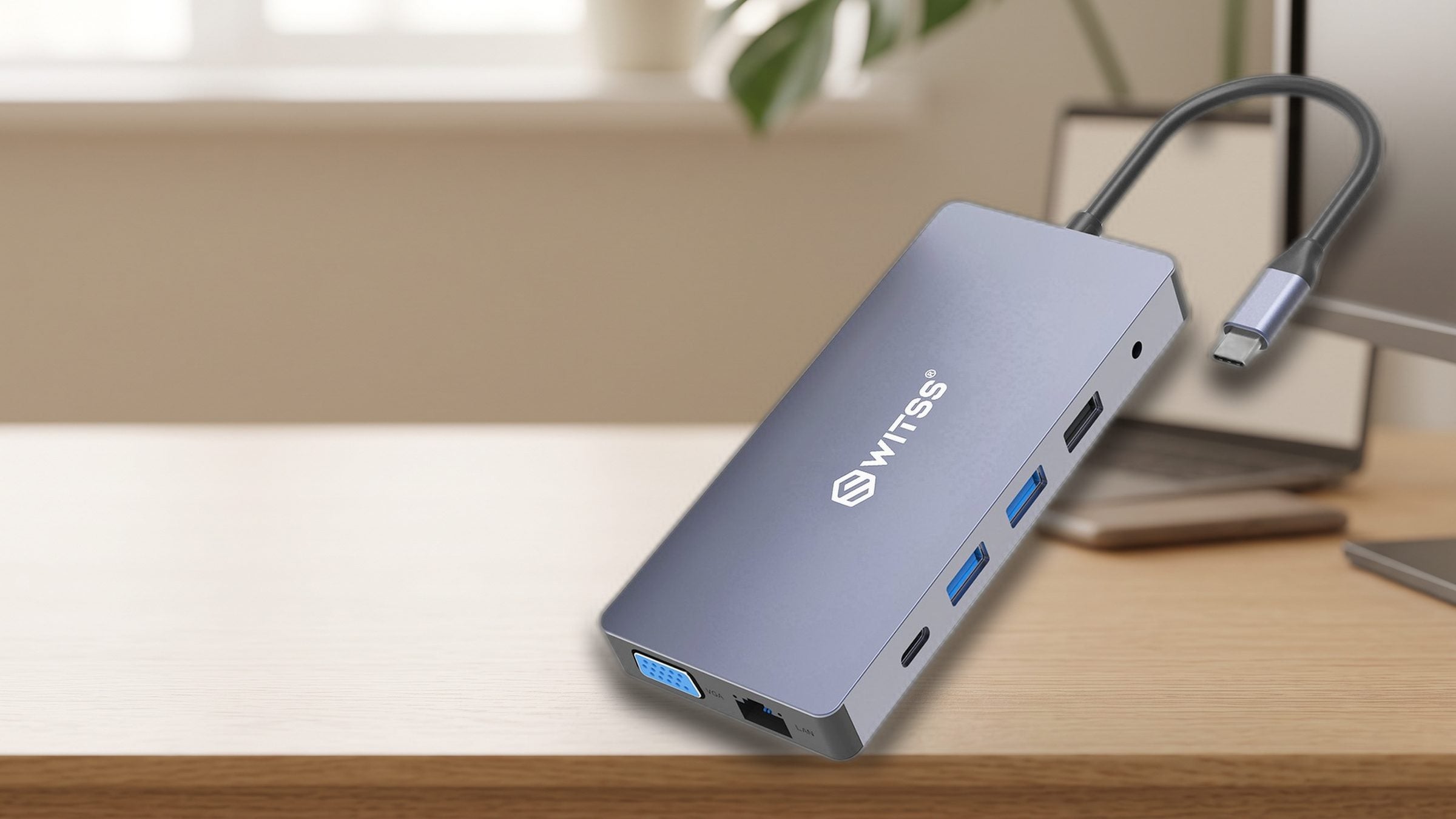

Switss® 12-in-1 USB-C Docking Station
Connect three monitors, gigabit ethernet, your laptop charger and nine other devices at once, all through one USB-C cable.
Order before 16:00, delivered tomorrow
Switss® 12-in-1 USB-C Hub
Twelve connections, three monitors, one cable.
Before you order: the connections you get, how to set it up and whether it works with your laptop.
More detail
For screens you get two HDMI ports (4K) and a VGA port. You also get internet via a network cable (gigabit), three USB ports, a USB-C data port, a charging port, an SD and microSD card reader and an audio jack for headphones or a microphone.
More detail
You connect the hub to your laptop's USB-C port; no separate power adapter is needed. You don't need extra software (drivers). To charge at the same time, connect your own USB-C charger of up to 100 watts to the charging port.
More detail
Three screens at once only work on Windows; on macOS, one external screen works. Video only works if your USB-C port carries it (DisplayPort Alt Mode). Without that feature, internet, USB, card readers and audio still work, but the screens do not.

razor-sharp via HDMI
More detail
Both HDMI ports display 4K at 30Hz: razor-sharp for office work, browsing and video. On a Windows laptop, VGA adds a third screen on top (1080p at 60Hz).
More detail
Both card readers work at the same time, at speeds up to 480 Mb per second per reader. Empty a memory card while you view the shots straight away on the big screen.

More detail
The two USB 3.0 ports each transfer up to 5 Gbps, ten times as fast as USB 2.0. Fast enough for an external SSD, while your keyboard, mouse and audio keep working as normal.
Three screens at once. Via 2x HDMI (4K at 30Hz) and 1x VGA (1080p at 60Hz), you connect three monitors at once to a Windows laptop. Ideal for home workers who want room for multiple windows side by side.

Your permanent home base. Set your laptop down, plug in one cable and your whole workspace comes alive.

Stable internet, no wifi drop-outs. The gigabit ethernet port gives you a stable wired connection. Video calls stop dropping out and large files transfer to your NAS smoothly.
More detail
The ethernet port is gigabit: up to 1000 Mb per second wired. For the full speed, use a Cat5e or Cat6 network cable; with an older router or switch, the hub automatically adapts to the lower speed.

Charge while you work. The USB-C PD port delivers 100 watts. That powers even the heaviest laptops at full speed, including a 16-inch MacBook Pro (96W) or a demanding Windows laptop with a discrete graphics card.

Everything connected. Three screens, fast storage and wired internet, all from a single hub.

Ready to use instantly on Windows and Mac. No software or drivers required. Connect the hub to a USB-C port with DisplayPort Alt Mode and every port works instantly on Windows, macOS, ChromeOS and Linux.

From video and network to memory cards and audio: everything you need for a full office desk setup, built into this one hub.
More detail
The hub has 2x HDMI, 1x VGA, 1x gigabit ethernet, 1x USB-C PD (100W), 1x USB-C data, 2x USB 3.0 (5 Gbps), 1x USB 2.0, 1x SD card reader, 1x microSD card reader and 1x 3.5 mm audio jack.

On a MacBook, the hub works great for one external screen via HDMI or VGA, plus all the other ports such as ethernet, USB, card readers and audio. Three screens at once isn't possible on macOS through this hub, due to the way macOS handles USB-C video. For that, you need a dock with DisplayLink technology.
More detail
On a MacBook, the hub works great for one external screen via HDMI or VGA, plus all the other ports such as ethernet, USB, card readers and audio. Three screens at once isn't possible on macOS through this hub, due to the way macOS handles USB-C video. For that, you need a dock with DisplayLink technology.

Read SD and microSD cards at the same time. The 3.5 mm audio jack comes in handy on laptops without their own audio output, or when you want to connect a second headset or speaker at your desk.
More detail
Both card readers work at the same time, at speeds up to 480 Mb per second per reader.
More detail
Read SD and microSD cards at the same time. The 3.5 mm audio jack comes in handy on laptops without their own audio output, or when you want to connect a second headset or speaker at your desk.
Both card readers work at the same time, at speeds up to 480 Mb per second per reader.
Work across three screens at once: email on the left, a meeting in the middle, documents on the right. One cable at the end of the day and your laptop comes with you.
Older projectors in meeting rooms and schools almost always have a VGA connection. Connect directly, without carrying a separate adapter.
Transfer SD and microSD cards to your laptop while viewing the footage on a bigger screen at the same time. Both card readers work simultaneously.
Connect your laptop directly to your router or NAS via the gigabit ethernet port for maximum network speed. No more wifi lag during large back-ups.

The hub is powered through your laptop's USB-C port. No external power adapter is needed, the hub draws power and signal through the same USB-C cable.
| Specification | Switss® 12-in-1 Hub |
|---|---|
| Video outputs | 2x HDMI (4K at 30Hz) + 1x VGA (1080p at 60Hz) |
| Max. screens at once | 3 screens on Windows; 1 screen on macOS |
| Ethernet | Gigabit (RJ-45, up to 1000 Mb/s) |
| Charging | USB-C PD 100W (pass-through) |
| USB ports | 2x USB 3.0 (5 Gbps) + 1x USB 2.0 + 1x USB-C data |
| Card readers | SD + microSD, up to 480 Mb/s |
| Audio | 3.5 mm combo jack (headphone/mic) |
| Dimensions and weight | 161 x 71 x 20 mm, 130 grams |
| Compatibility | Windows 10 and up, macOS, ChromeOS, Android, Linux; requires USB-C with DisplayPort Alt Mode for video |
5% off from 2 units · 10% off from 10 units applied automatically in your cart
Invoice with VAT · KvK 76439534 · VAT NL860623646B01
On most modern Windows laptops with a USB-C port that supports DisplayPort Alt Mode, yes. Check your laptop's manual to see whether the USB-C port is described as 'USB-C with DP', 'Thunderbolt' or 'DisplayPort Alt Mode'. If so, the 2x HDMI and VGA work at the same time for three screens. Some older Windows laptops can only drive two external screens through a single USB-C port; check your graphics card's specifications.
No. On macOS the hub works for one external screen via HDMI or VGA, plus all the other ports such as ethernet, USB, card readers and audio. Three screens at once through a single USB-C port isn't possible on macOS without DisplayLink technology. M1 and M2 MacBooks support only one external screen via native USB-C Alt Mode. If you want multiple screens on a Mac, look for a dock with DisplayLink.
DisplayPort Alt Mode is the feature that lets a USB-C port send a video signal to a monitor or hub. Not every USB-C port has this. Check your laptop's manual or specifications page. Does it say 'USB-C with DP', 'USB-C with DisplayPort', 'Thunderbolt 3' or 'Thunderbolt 4'? Then video works through this hub. Does it only say 'USB-C for charging'? Then the HDMI and VGA ports won't work, but all the other ports (ethernet, USB, card readers, audio) will.
Yes. The USB-C PD port delivers 100 watts, which is enough for virtually all USB-C laptops, including the 16-inch MacBook Pro (96W) and demanding Windows laptops. Connect your own USB-C charger to the hub's PD port and the power travels to your laptop through that same USB-C cable. Don't use more than one charger at a time on the PD port.
The ethernet port is gigabit: up to 1000 Mb per second. For the full speed, use a Cat5e or Cat6 network cable and connect directly to your router or switch. If you have a 10/100 Mbit router or an older switch, the hub automatically adapts to that lower speed.
No. The hub draws power through your laptop's USB-C port. If you want to charge at the same time, connect your own USB-C adapter to the hub's PD port. No separate power adapter is included in the box.
Still not sure? Ask your question and a real person usually replies within one working day.
5.0 Based on 2 reviews
The average is calculated over the reviews shown here. The coloured label shows where a review was posted, for example bol or our own store. Reviews from other websites are copied unchanged. Verified purchase means the author bought the product there. We show every review that says something about the product, including negative ones, and we never edit the text. Reviews only about delivery or customer service and reviews containing insults are not shown. A review posted in more than one place is shown once. A review written in another language than yours is translated automatically.
all connections work properly
searched for a long time for a vga connection for a relatively old external screen next to laptop
Could not connect my scree n to the laptop together with the charger of the laptop.
This device fixed the problem and still spacw for extra connections.
Satisfie customer


Switss® is a Dutch brand run by two brothers, Matthijs and Luca. Send us your question and your laptop model. One of us usually replies within one working day.
The 8-in-1 hub, the 12-in-1 hub and the 5-in-1 (enclosure + hub) with M.2 slot side by side, so you see the difference at a glance.
| Feature | 
Switss® 8-in-1 USB-C Hub €11,99incl. VAT€9,91excl. VAT View | You're viewing this one
Switss® 12-in-1 USB-C Hub €29,99incl. VAT€24,79excl. VAT View | 
5-in-1: enclosure + hub €39,99incl. VAT€33,05excl. VAT View |
|---|---|---|---|
| Laptop connection | USB-C with DisplayPort Alt Mode (required) | USB-C with DisplayPort Alt Mode (required for video) | USB-C (USB 3.2 Gen 2, video signal required for HDMI) |
| Max. screens | 1 screen (HDMI) | 3 screens on Windows; 1 screen on macOS¹ | 1 screen (HDMI) |
| HDMI resolution | 4K UHD (3840x2160) at 30 Hz | 2x HDMI (4K at 30Hz) + 1x VGA (1080p at 60Hz) | 4K at 60Hz (HDMI only); 4K at 30Hz with simultaneous M.2 use |
| Ethernet | Gigabit RJ45, up to 1000 Mb per second | Gigabit (RJ-45, up to 1000 Mb/s) | Not present |
| Charging (Power Delivery) | 65W to laptop (87W power supply required) | 100W (passthrough) | Up to 100W (pass-through) |
| USB ports | 2x USB 3.0 (5 Gbps) + 1x USB-C data | 2x USB 3.0 (5 Gbps) + 1x USB 2.0 + 1x USB-C data | 2x USB-A (5 Gbps) + 1x USB-C data (5 Gbps) |
| Card reader | SD + microSD, up to 480 Mb/s | SD + microSD, up to 480 Mb/s | Not present |
| Notable feature | Compact, 178 x 30 x 10 mm | VGA output for older projectors/screens | Built-in M.2 SSD slot (NVMe/SATA, up to 10 Gbps), SSD not included |
| Warranty | 3-year manufacturer's warranty | 3-year manufacturer's warranty | 3-year manufacturer's warranty |
¹ On macOS, every hub works with one external screen via HDMI or VGA, plus all other ports such as ethernet, USB, card readers and audio. Three screens at once via one USB-C port is not possible on macOS without DisplayLink technology. M1 and M2 MacBooks support only one external screen via native USB-C Alt Mode. If you want multiple screens on a Mac, look for a dock with DisplayLink.
These products work extra well together. Ordered once, delivered once.


€18,99incl. VAT€15,69excl. VAT
Together
€48,98incl. VAT€40,48excl. VAT
€46,55incl. VAT€38,47excl. VAT
5% combo discount, automatically applied in your cart

€29,99incl. VAT€24,79excl. VAT
Together
€59,98incl. VAT€49,57excl. VAT
€57,00incl. VAT€47,11excl. VAT
5% combo discount, automatically applied in your cart


€12,49incl. VAT€10,32excl. VAT
Together
€42,48incl. VAT€35,11excl. VAT
€40,37incl. VAT€33,36excl. VAT
5% combo discount, automatically applied in your cart
Guide articles related to this product, with clear explanations on use and connection.

This isn't the first time you're buying something for business, and you know what you need before trusting a new supplier: an...

You don't manage just one workplace but several: your own office, one or more client locations, maybe a flex desk on top...

You've got a new laptop with just one USB-C port, and you're considering a hub, but what if it turns out not...
 A Dutch brand you can rely on
Your Cart is Empty
Storage. Connection. Simplicity.
Goes well with your order
€18,99