
2-in-1: 3.5 and 2.5 inch. The enclosure works with both 3.5 inch and 2.5 inch SATA hard drives and SSDs. No need to buy a separate enclosure for each drive size.


Questions about a product or your order? We reply within 24 hours.
Ask your question info@cmbt-e.com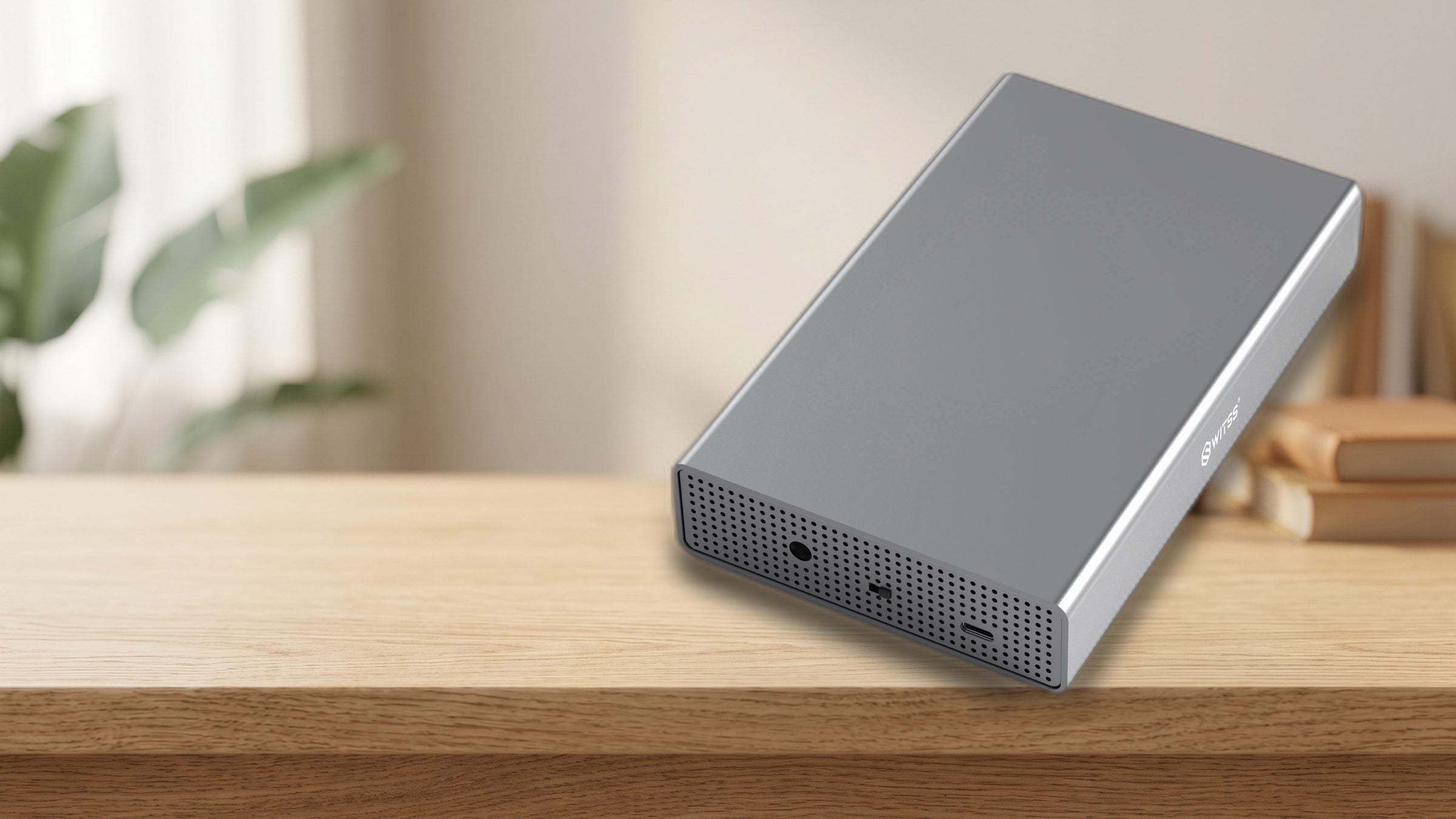

Switss® 3.5"/2.5" HDD/SSD Enclosure
Give your loose 3.5 or 2.5 inch hard drive a second life as external storage, up to 10x faster than USB 2.0, suited for drives up to 20 TB.
Order before 22:00, delivered tomorrow
Switss® 3.5″/2.5″ Enclosure
Up to 20 TB, USB 3.0 with UASP, ready to use right away.
More detail
Connect your loose 3.5 or 2.5 inch hard drive or SSD via USB and it's instantly available as an external drive.
Via USB 3.0 with UASP you reach read speeds up to about 400 MB per second. With a traditional hard drive, transferring 1 GB takes 7 to 10 seconds.
Connect your loose 3.5 or 2.5 inch hard drive or SSD via USB and it's instantly available as an external drive.
More detail
Via USB 3.0 with UASP you reach read speeds up to about 400 MB per second. With a traditional hard drive, transferring 1 GB takes 7 to 10 seconds.
More detail
USB 3.0 with UASP transfers up to 5 Gbps. With an SSD you reach read speeds up to about 400 MB per second and write speeds up to about 300 MB per second.
Please note: drive not included. Suited for your own 3.5 or 2.5 inch drive.

from Windows and Mac to PlayStation and Xbox
More detail
Works straight away on Windows 7 and higher, macOS 10.6.5 and higher, Linux, Android and Chromebook. Also on PlayStation 4 (games and media), PlayStation 5 and Xbox (media), and on iPhone 15 or newer and iPad Pro with USB-C. No driver or software needed.
More detail
Via USB 3.0 with UASP, an SSD reaches read speeds up to about 400 MB per second and write speeds up to about 300 MB per second. With a traditional hard drive, transferring 1 GB usually takes 7 to 10 seconds.

More detail
Aluminium conducts heat away much faster than plastic, and the open ventilation lets that heat escape. This keeps your drive cooler during long use, preventing overheating and premature wear.
2-in-1: 3.5 and 2.5 inch. The enclosure works with both 3.5 inch and 2.5 inch SATA hard drives and SSDs. No need to buy a separate enclosure for each drive size.

Get on with your day. The enclosure works quietly alongside you, even sitting right in the living room.

Stable power for large drives. For 3.5 inch drives you use the included power adapter. This keeps the enclosure running stably with hard drives up to 20 TB, even at high capacities.

A fixture on your desk. Up to 20 TB of extra storage, always within reach next to your monitor.

Ready to use on any device. Works right away on Windows, Mac, Linux, PlayStation and Xbox. No drivers or software needed, just plug in and go.

Aluminium with open cooling. The aluminium design with open cooling carries away heat naturally. Your drive stays cool, even during long transfers of large files.

Via USB 3.0 with UASP your drive is up to 10 times faster than over an older USB 2.0 port.
More detail
Via USB 3.0 with UASP you reach read speeds up to about 400 MB per second with an SSD and write speeds up to about 300 MB per second. With a traditional hard drive, transferring 1 GB typically takes 7 to 10 seconds. On an older USB 2.0 port the speed will be lower.

More detail
Aluminium conducts heat better than plastic, and the open ventilation helps carry heat away further. Your drive stays cooler during long transfers, which benefits its lifespan.
Aluminium conducts heat away much faster than plastic, and the open ventilation lets that heat escape. This keeps your drive cooler during long use, preventing overheating and premature wear.
Aluminium conducts heat better than plastic, and the open ventilation helps carry heat away further. Your drive stays cooler during long transfers, which benefits its lifespan.
More detail
Aluminium conducts heat away much faster than plastic, and the open ventilation lets that heat escape. This keeps your drive cooler during long use, preventing overheating and premature wear.

More detail
The enclosure supports drives up to 20 TB, any brand with a SATA connector. An external 8 TB back-up drive or a 16 TB archive drive fit in without any trouble.
The enclosure works with 3.5 and 2.5 inch SATA hard drives and SSDs, any brand, up to 20 TB. Both an 8 TB back-up drive and a 16 TB archive drive fit in without any trouble.
The enclosure supports drives up to 20 TB, any brand with a SATA connector. An external 8 TB back-up drive or a 16 TB archive drive fit in without any trouble.
More detail
The enclosure works with 3.5 and 2.5 inch SATA hard drives and SSDs, any brand, up to 20 TB. Both an 8 TB back-up drive and a 16 TB archive drive fit in without any trouble.
Take the drive out of an old desktop or NAS device and give it a second life as an external back-up drive.
Keep a safe copy of your photos, videos and documents on a separate drive of multiple terabytes.
Photographers and video makers store their RAW files and projects on it. An 8 TB drive or larger fits right in.
Connect the enclosure to a PlayStation 4 for extra game storage, or use it on PS5 and Xbox for media and video.

| Specification | Switss® 3.5"/2.5" Enclosure |
|---|---|
| Connection | USB 3.0 with UASP (USB-A) |
| Maximum speed | Up to 5 Gbps; read approx. 400 MB/s, write approx. 300 MB/s with SSD |
| Suited for | 3.5 inch and 2.5 inch SATA HDD and SSD, any brand |
| Maximum capacity | Up to 20 TB |
| Material | Aluminium with open cooling |
| Power | 3.5 inch via included power adapter; 2.5 inch via USB cable |
| Compatibility | Windows 7 and up, macOS 10.6.5 and up, Linux, PS4, PS5 (media), Xbox (media), iPhone 15+, iPad Pro USB-C, Android, Chromebook |
| Drivers needed | No, ready to use right away |
| Drive included | No, not included |
5% off from 2 units · 10% off from 10 units applied automatically in your cart
Invoice with VAT · KvK 76439534 · VAT NL860623646B01
No. The enclosure ships without a drive. You fit your own 2.5 or 3.5 inch SATA hard drive or SSD.
All 2.5 inch and 3.5 inch SATA hard drives and SSDs, any brand, up to 20 TB. Not suited for M.2 SSDs or NVMe PCIe drives.
For 3.5 inch drives, yes. The included power adapter supplies the power these drives need. A 2.5 inch drive or SSD gets its power directly through the USB cable, so you don't need a power adapter for that.
Yes, right away on Windows 7 and up, macOS 10.6.5 and up, and Linux. Also on PlayStation 4 for games and media, and on PlayStation 5 and Xbox for media. It also works on iPhone 15 or newer, iPad Pro with USB-C, Android and Chromebook. No software or driver needed.
With an SSD you reach read speeds up to about 400 MB per second via USB 3.0 UASP. With a traditional hard drive, transferring 1 GB typically takes 7 to 10 seconds. Speed also depends on your drive and the port on your computer.
A new or blank drive first needs to be prepared using Disk Management in Windows or Disk Utility on the Mac. After that it shows up as a normal drive and you can start saving files.
4.8 Based on 32 reviews
The average is calculated over the reviews shown here. The coloured label shows where a review was posted, for example bol or our own store. Reviews from other websites are copied unchanged. Verified purchase means the author bought the product there. We show every review that says something about the product, including negative ones, and we never edit the text. Reviews only about delivery or customer service and reviews containing insults are not shown. A review posted in more than one place is shown once. A review written in another language than yours is translated automatically.
The Switss - HDD/SSD Enclosure 3.5 and 2.5 inch is a beautiful and solid metal case and does its job fine, once it is put together. That ran into the problem for me that the four screws with which the disk is mounted in the inner part, had too thick heads, because of which the inner part could not be slid completely into the casing anymore. Luckily I had in my junk drawer four fitting screws with flat heads and so it worked out after all.
The placed 2.5 inch SSD fits well in the connector only the screw holes in the bottom of the enclosure are in a different place than the screw holes in the SSD. A piece of ductape now holds the little drive in place. The metal enclosure also protects against magnetic and electrical fields.
It works fine otherwise.
To be able to use the hard drive from your old desktop longer and not lose any data this is a wonderful solution. Simple installation and beautiful solution.
Pros
The HDD enclosure looks good and is put together sturdily, is made of metal.
Drive is immediately recognized on Mac, and backup works perfectly.
Only when installing the disk there is no possibility to secure a 2.5” disk with screws, there are no holes in those places, and no adapter.
Also the front and back sit just a little too high, making it difficult (but not impossible) to get the tray back in place.
The rubber feet go over the screws that secure the tray to the outside, so if I want to swap the disk, they have to come off first again.
Conclusion, the product is perfectly adequate for a 3.5” disk, but for quick swapping (which I had hoped for) this is somewhat less.
Pros
Cons
It was easy to slide my HDD into the enclosure. After that tighten screws and you can immediately use your HDD as an external hard drive.
Pros
Cons
Within 24 hours after ordering mounted the hard drive in the enclosure and made the first backup. Works fast and virtually silently. I am very satisfied
Unpacked and viewed the article quickly, top quality! Perfectly packed! Very happy with it.
If I am going to place my old hdd in it soon I will update this reaction, with, I assume, only words of praise!!
Pros
Cons
Unfortunately this is a missed opportunity. The enclosure is in terms of design the best I could find. Fully aluminum. Also the front and back plates are made of aluminum, and are full of ventilation holes. Almost perfect design, just a bit of a small on/off button. Unfortunately the product is equipped with a cheap "Chipsbank CBM3639" chipset. Because of this I sent it back, and instead bought an Inateck with a better "ASMedia ASM1153E" chipset. A pity, because the design of the enclosure itself is better with this Switss.
Pros
Cons
after some searching and reading reviews on the internet I finally ended up with the Swiss it does what it has to do more than that I don't need
Pros
Cons
This is my first (aluminum) case that also really keep my HDD cool ! ! Interior is made of metal, no plastik. In the box one USB3-C cable plus xtra USB3-C-A adapter, both of good quality. Also a 220V - 12V power adater and screws plus mini-screwdriver.
The packaging alone already gives the impression that this is quality. That also turns out to be the case after opening.
Hard drive is placed in no time. Only disadvantage is that the cover of the enclosure is secured at the bottom and where subsequently rubber feet must be stuck. If you ever want to replace the drive the feet must be removed. Question if they will stick again then.
Furthermore sturdy case and swift transfer. A standard USB to USB-C adapter is included. Also neat with a little cord so that it can be attached to the cable.
Pros
Cons
Beautiful sturdy, sleek little box that now provides shelter to a 2TB HD from a discarded desktop for me. It faces a new life as a backup of my music files.
Installing the HD in this enclosure is a breeze. If you can hold the supplied screwdriver you have 10 min. after receipt a cheerfully crackling external HD.
I am very satisfied with it.
Pros
Cons
A solid enclosure, everything is included.
The on-off switch seems of mediocre quality to me.
Upon delivery the little screws to close the enclosure were missing, resolved without problems after contact with the supplier.
Pros
Cons
simple, insert HDD screw in, close enclosure, format disk and hop everything ready.
Works silently!
The mini-manual included in the packaging can cause confusion; states "works on standard USB 5V", while the included power supply has an output voltage of 12 Volts. So the device works on 12V.
Pros
I use the enclosure for both old 3.5" HDDs and newer 2.5" SSDs and that works perfectly. Everything included cables and power supply. Even a little screwdriver to screw the case shut. Solid quality, no plastic junk and well packaged.
Pros
Product delivered day after ordering, neatly packaged with all necessary accessories (even small screwdriver) - immediately built in (old) HDD and put into use as extra external storage.
Pros
Fine enclosure, sturdy and easy to put the HDD in.
Fast delivery and received an excellent quality product.
Good solid enclosure for 3.5 inch drives. Looks sleek and comes complete however for a 2.5 disc I haven't been able to discover how to secure it. It can be connected however and if you don't have to move it much it probably won't be an objection. For 3.5 inch discs highly recommended. For the smaller ones it wouldn't be my choice
Pros
Cons
Old Pc broken, took the hard drive out and placed it in the enclosure. Putting it together is a piece of cake, and all material to mount it is included. Can read all my data and transfer it to my new Pc.
Looks nice too.
Pros
Cons
Extremely neat in terms of execution and packaging. Works perfectly.
Excellent enclosure. putting it together was easy and it is plug and play. It also looks nice. Recommended!
Pros
Clear , intuitive to instal.
Works instantly.
Pros
Cons
good solution for the reuse of an older sata drive from previous computer and available via usb on new computer.Looks solid.Neat fast delivery.
Just delivered on time. Building in HDDs was a piece of cake.
Perfect
Pros
Cons
I bought 2 enclosures 1 for 1tb large hard drive 3/5"and 1 for a smaller hard drive of 2.5"
The larger drive you secure with 4 screws in the tray. Tray itself you secure with 4 very small screws which you stick with 4 rubber feet and it's done.
The casing is made of metal , so no cheap plastic box, plug & play.
Pros
Very good
Bought new PC with Windows 11 on it.
Taken the hard drive out of the old PC and mounted it in the Switss enclosure. I can perfectly read all my data and possibly transfer it to the new hard drive. It has become an external hard drive.
So I am very satisfied with this purchase.
Pros
Cons
Just placed the HD in the Switss HD enclosure, everything neatly secured with the supplied screws and the Switss HD/SSD enclosure was immediately usable.
Looks nice and is noiseless!
Pros
Sturdy aluminum hard disk enclosure.
Feels like quality and is delivered very complete.
Cable is longer than normally included too (estimate 1m) and is usb-c to usb-a but with adapter to usb-c and feels very solid.
Only small point of criticism is that the mini screwsat the bottom of the enclosure are neatly hidden away under the glued rubber feet but is bit inconvenient if you regularly switch disks so in my case have glued them next to it which makes it look a bit less sleek at the bottom but you normally don't see that anyway.
Works fast otherwise and without problems.
Pros
Cons
Ideal solution to make internal HDD external. The HDD is easy to click into the case and after that you can also screw it to the case with included screws and screwdriver. Connected to new PC via usb and external adapter. Runs like a train! There is also an on/off switch on the case. And rubber stickers are included that can be stuck to the bottom so the case doesn't scratch if you put it on the PC for example.
Pros
The hard drive fit in nicely
These products work extra well together. Ordered once, delivered once.


€12,49incl. VAT€10,32excl. VAT

Together
€42,48incl. VAT€35,11excl. VAT
€40,37incl. VAT€33,36excl. VAT
5% combo discount, automatically applied in your cart

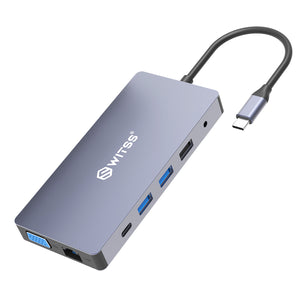
€29,99incl. VAT€24,79excl. VAT
Together
€59,98incl. VAT€49,57excl. VAT
€57,00incl. VAT€47,11excl. VAT
5% combo discount, automatically applied in your cart


€18,99incl. VAT€15,69excl. VAT
Together
€48,98incl. VAT€40,48excl. VAT
€46,55incl. VAT€38,47excl. VAT
5% combo discount, automatically applied in your cart
Guide articles related to this product, with clear explanations on use and connection.

This isn't the first time you're buying something for business, and you know what you need before trusting a new supplier: an...

You have an old hard drive lying around, from a computer that became slow, or one you got rid of during a...

Rescuing photos from your old computer: that's probably exactly why you're here. Your old computer is getting slow, or you're moving house...