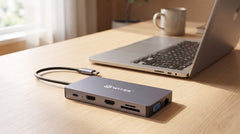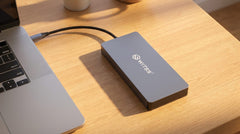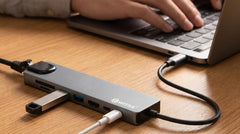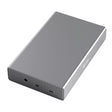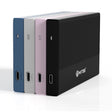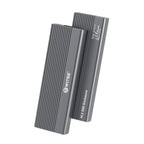



The short answer: choose a USB-C hub with a built-in SD and microSD reader, and you'll transfer your footage without a separate dongle. Plug the hub into your laptop, click your memory card into place, and your files appear directly in Lightroom, Premiere or your file explorer. The Switss® 12-in-1 USB-C hub and the Switss 8-in-1 USB-C hub both have readers on board, alongside HDMI, ethernet and USB ports.
One less cable, one less worry
After a shoot you want to bring in your footage and get to work, not turn your bag inside out looking for a separate card reader. That dongle gets lost, takes up a port and does nothing else.
A hub with a built-in card reader handles this differently. It's already sitting on your desk or in your bag as the central connection point for your screen, network and charger. The card reader simply comes along for the ride, so you don't need anything extra.
SD or microSD? Often both
Most photographers and video creators work with a mix of cards. That's why it helps to know which device uses which format.
A full-size SD card is typically found in mirrorless and DSLR cameras (Sony Alpha, Canon EOS, Nikon, Fujifilm X, Panasonic Lumix), in many video recorders and in a number of larger drones.
A microSD card is found in action cams (GoPro, DJI Action), compact drones (DJI Mini), smartphones, dashcams and body cams.
If you work with both a mirrorless camera and a GoPro or drone, you're juggling two formats. A hub with both readers saves you a swap every time.
Which Switss hubs have a card reader?
Only the 8-in-1 and the 12-in-1 have card readers on board. Both have SD and microSD, and you can use them at the same time.
| Hub | SD card | microSD card |
|---|---|---|
| Switss 8-in-1 USB-C hub | Yes | Yes |
| Switss 12-in-1 USB-C hub | Yes | Yes |
| Switss 5-in-1 hub + M.2 enclosure | No | No |
| Switss M.2 enclosure (standalone) | No | No |
The two slots work as separate drives. You can load from SD and microSD at the same time, but copying between them always runs through your laptop.
How fast does it transfer your footage?
Transfer speed depends on three things: the hub's USB connection, your card's speed class, and how much bandwidth the hub frees up. On Switss, the 8-in-1 and 12-in-1 drive their card readers internally over USB 3.0.
With a quick UHS-I card (V30/U3) you'll get around 80–90 MB/s in practice. That's plenty to pull in a batch of RAW files or a chunk of 4K video while your coffee is still warm.
Have UHS-II cards (rated up to 312 MB/s on paper)? Through a USB 3.0 reader, they perform roughly the same as UHS-I. You'll only get that extra edge with a dedicated UHS-II reader; for most workflows you won't notice much difference.
| What you're transferring | Size | Time at ~80 MB/s |
|---|---|---|
| 1 RAW photo (24 MP) | ~25 MB | under 1 second |
| 200 RAW photos | ~5 GB | ~1 minute |
| 4K video, 10 minutes | ~15 GB | ~3 minutes |
| 4K video, 1 hour | ~90 GB | ~19 minutes |
These are indicative figures. Actual speed varies by card brand, speed class and how busy your laptop is at the time.
8-in-1 or 12-in-1: which one suits you?
Both have the same card readers. The difference lies in the rest of the ports and how much your workspace demands.
| Feature | 8-in-1 | 12-in-1 |
|---|---|---|
| External displays | 1 (HDMI 4K@60Hz) | up to 3 (2× HDMI + VGA) |
| Power Delivery | 65W | 100W |
| Ethernet | Gigabit | Gigabit |
| 3.5mm audio jack | No | Yes |
| USB-A | 2× USB 3.0 | multiple |
Choose the 8-in-1 if you work with one external display and want a compact, portable hub. Ideal for a MacBook Air or a mid-range Windows laptop, and small enough for your camera bag.
Choose the 12-in-1 if you have a fixed workspace with two or three displays, a heavier laptop that needs 100W of charging power, or you need an audio jack for a headset or microphone while editing.
What this looks like in practice
Studio photographer: mirrorless camera with an SD card, laptop on an external display, images go straight into Lightroom. The compact 8-in-1 handles this both in the office and on location.
Video creator on the go: loading a GoPro (microSD) and a camera (SD) at the same time while your laptop charges and sits on a monitor for review. With the 12-in-1 you combine that with 100W charging and two displays.
Content creator at home: bringing in drone footage (microSD) and camera photos (SD), editing in Premiere or DaVinci Resolve, output to your screen via HDMI, all through one hub on the desk.
A few things to keep in mind
- No driver needed. The readers work straight away on macOS, Windows 10/11 and Chrome OS.
- Large cards? No problem. SDXC (up to 2 TB) is backward compatible, so any SD reader reads it.
- Eject safely. Eject the card properly before removing it, just as you would a USB stick.
- The hub is not a NAS. Going straight from card to external drive is possible, but the copy always runs through your laptop.
In short
A hub with an SD and microSD reader is a small purchase that saves you time every working day: fewer dongles, fewer cables, faster into the edit. And if you're not satisfied, Switss gives you 30 days returns, a 3-year warranty and Dutch customer service that thinks along with you.
Work mobile and compact, then the Switss 8-in-1 USB-C hub with 65W charging, HDMI and ethernet is the smart choice. Have a fixed studio with multiple displays or a heavier laptop, then the Switss 12-in-1 USB-C hub offers the same card readers plus 100W and support for three external displays at once.
Frequently asked questions
Can I use an SD and a microSD card at the same time?
Yes. The two slots work independently of each other, so you can load an SD and a microSD card at the same time. Copying between them always runs through your laptop, though.
How fast does the hub read my cards?
With a fast UHS-I card (V30/U3) you'll get around 80–90 MB/s in practice via the USB 3.0 reader. Enough to transfer RAW series and 4K video smoothly.
Does the card reader work with large SDXC cards up to 2 TB?
Yes. SDXC is backward compatible with SD and SDHC, so any reader that supports SD also reads SDXC cards up to 2 TB.
Do I need a driver or installation?
No. The card readers on the 8-in-1 and 12-in-1 work without separate drivers on macOS, Windows 10/11 and Chrome OS. Plug in and go.
Which Switss hub should I choose as a photographer or video creator?
If you work mobile with one display, choose the compact 8-in-1 (65W). If you have a fixed workspace with multiple displays or a heavier laptop, the 12-in-1 (100W, up to 3 displays) fits better.