


You've just fitted a new, faster SSD in your PC or laptop, and the old drive is now sitting loose on your desk. It usually still works fine; it wasn't replaced because it was broken, but because it had become too small or too slow as your main drive. Three questions come up at that point: what type of drive is it exactly, what can you do with it, and which enclosure fits it? This article brings together the answer to all three. It doesn't replace the more in-depth articles on this site: from here, it points you to the shortest route to the right follow-up piece.
First things first: what type of SSD do you have?
Before you read on, it helps to know which type of drive you're dealing with. There are two forms:
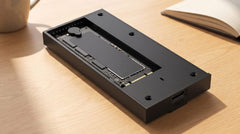
- M.2 SSD: a narrow circuit board a few centimetres long, with an M-key or M+B-key connector, in sizes 2230, 2242, 2260 or 2280.
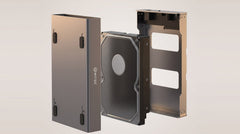
- 2.5-inch SATA drive: a rectangular case, roughly the size of a pack of chewing gum, as a hard drive or SSD.
A 3.5-inch drive falls outside the scope of this article: it only covers M.2 and 2.5-inch SATA SSDs. You can still use one externally, but that requires a separate enclosure with its own power supply.
If you want to understand the technical difference between NVMe and SATA, for example to work out which speed is achievable, read NVMe vs SATA M.2 SSD: what's the difference (and what do you need)?. If you also want to include hard drives and 3.5-inch drives in the decision, Which enclosure do I need for my old hard drive? will help you further.
What can you actually do with an old SSD?
This is the core question of this article: you have a working drive left over, and there are three realistic routes.
Reuse it as an external drive (the most common choice)
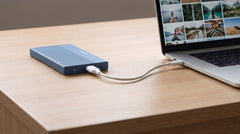
Your old SSD was replaced because it became too small or too slow as your main drive, not because it's broken. As an external drive for photos, documents or an extra backup, it still has years of use left in it: that saves a new purchase, and a working drive doesn't belong in electronic waste. Which enclosure fits your drive type is covered in the comparison below.
Sell or give it away
Would you rather sell or give away the drive? Wipe it thoroughly first. Simply moving files to the recycle bin isn't enough: deleted files can often still be recovered with the right software. Only pass the drive on once you're certain nothing personal remains on it.
Recycle it (drive is faulty or technically outdated)
Has the drive stopped working, or is it so outdated that reuse no longer makes sense? Then it doesn't belong with regular household waste: drop it off at an electronics recycling point.
Compare the two enclosures by drive type
Prices and specifications below were checked on switss.nl on 24 July 2026. Check the product page for the current price. This is a small, practical purchase, not a luxury item, but it does make the difference between a drive that sits unused and one that becomes useful again.
| M.2 NVMe or M.2 SATA | 2.5-inch SATA | |
|---|---|---|
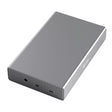
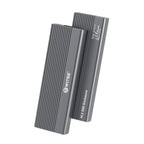
| Product | Switss M.2 SSD enclosure with heatsink | Switss 2.5" HDD/SSD enclosure |
| Connection | USB-C 3.2 Gen 2, 10 Gbps | USB-C (USB 3.0 with UASP, a protocol that speeds up transfer) |
| Top speed | up to 1050 MB/s (NVMe) · up to approx. 500 MB/s (SATA) | up to 450 MB/s (SSD) · 100-180 MB/s (HDD) |
| Max. capacity | up to 8 TB | up to 4 TB |
| Installation | tool-free, clicks into place | tool-free, clicks into place |
| Price | €18,99 | €12,49 |
If you have an M.2 NVMe or M.2 SATA SSD, Turn an M.2 SSD into an external drive: step by step lays out the exact installation steps for you. If you have a 2.5-inch SATA drive, Reusing an old 2.5-inch laptop drive as an external drive walks through the same steps for that format. Still not sure whether your M.2 SSD fits the enclosure in terms of length (2230/2242/2260/2280) and connector (M-key or M+B-key)? "Does my M.2 SSD fit in an external enclosure? Check this before you order" (once published) walks you through that in three steps.
Speed: is it worth keeping your old SSD?
In most cases, yes. An M.2 NVMe SSD reaches up to 1050 MB/s, a SATA M.2 up to approximately 500 MB/s, and a 2.5-inch SSD up to 450 MB/s, in all three cases comfortably faster than an external hard drive, which works with 100 to 180 MB/s. If you want the full technical explanation, including the difference between Gbps (the speed of the connection) and MB/s (the speed at which you actually transfer files), read NVMe vs SATA M.2 SSD: what's the difference (and what do you need)?. The more in-depth buying guide "Buying an M.2 SSD enclosure: complete buying guide (which one fits your drive and use case?)" goes into it in more detail.
Want more speed than your old SSD delivers?
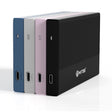
If you find while reading that you'd rather use a new, faster NVMe SSD externally at the full speed it also reaches internally, there's a step up: the Switss M.2 SSD enclosure USB4, 40 Gbps (€69,99, checked 24-07-2026), four times the bandwidth of the standard M.2 enclosure above. How Thunderbolt, USB4 and regular USB-C relate to each other is explained in Thunderbolt 4 vs USB4 vs USB 3.2: Speeds Compared. Want to see all three M.2 enclosures (heatsink, RAID and USB4) compared side by side in detail before you choose? "USB4 SSD enclosure: get the full speed out of your NVMe drive, even externally" lines them up.
Did you just finish a laptop upgrade?
Did you just physically remove the SSD from your laptop and haven't gone through the exact removal steps yet? Those aren't covered in this article: the physical replacement steps are explained in "Replacing the SSD in your laptop: what do you do with the old drive?". This article is about the loose drive itself, from a laptop or a PC, regardless of how you took it out.
Warranty and returns
All Switss enclosures come with a 3-year manufacturer's warranty and Dutch customer service. Not sure after your purchase? You have 30 days to return it.
Frequently asked questions
What's the best thing to do with my old SSD?
If it still works, reusing it as an external drive for photos, documents or an extra backup is the most common and sensible choice. If you'd rather sell or give it away, wipe it thoroughly first. If the drive is faulty or technically outdated, drop it off at an electronics recycling point.
How do I know if my old drive is an M.2 SSD or a 2.5-inch SSD?
An M.2 SSD is a narrow circuit board a few centimetres long with an M-key or M+B-key connector, in sizes 2230, 2242, 2260 or 2280. A 2.5-inch SATA drive is a rectangular case, roughly the size of a pack of chewing gum.
Do I need to wipe my old SSD before I sell or give it away?
Yes. Simply moving files to the recycle bin isn't enough: deleted files can often still be recovered with the right software. If you're going to keep using the drive yourself, you don't need to wipe anything; the files just stay in place and accessible.
Is an old SSD still worth keeping, or is it better to throw it away?
If it still works, throwing it away is a waste: as an external drive it still has years of use left in it, and that saves a new purchase. Only if the drive is faulty or technically outdated is recycling it at an electronics recycling point the advice.
Can I just use my old SSD in an external enclosure?
Yes, as long as the size and connector match: an M.2 SSD in sizes 2230, 2242, 2260 or 2280 in the M.2 enclosure, or a 2.5-inch SATA drive in the 2.5" enclosure.
Does an old SSD lose speed if I use it externally?
With a SATA M.2 or a 2.5-inch SSD, barely: the connection was already the limiting factor internally too, so externally (up to approximately 500 MB/s and 450 MB/s respectively) that stays comparable. With an M.2 NVMe SSD, it can be different: this enclosure reaches up to 1050 MB/s, while a fast NVMe SSD can often run (much) higher internally via PCIe, so external use can mean a noticeable ceiling. This last point is general technical knowledge, not a Switss product claim: how much a specific SSD reaches internally varies by model.
Next step
Do you now know what type of drive you have? Check the specifications and current price on the product page: Switss M.2 SSD enclosure with heatsink (€18,99, checked 24-07-2026) for an M.2 NVMe or M.2 SATA SSD, or Switss 2.5" HDD/SSD enclosure (€12,49, checked 24-07-2026) for a 2.5-inch SATA drive.