
Set RAID without software. Using the dip switches and confirm button on the enclosure, you choose the mode that suits you. No software to install, no computer needed.


Questions about a product or your order? We reply within 24 hours.
Ask your question info@cmbt-e.com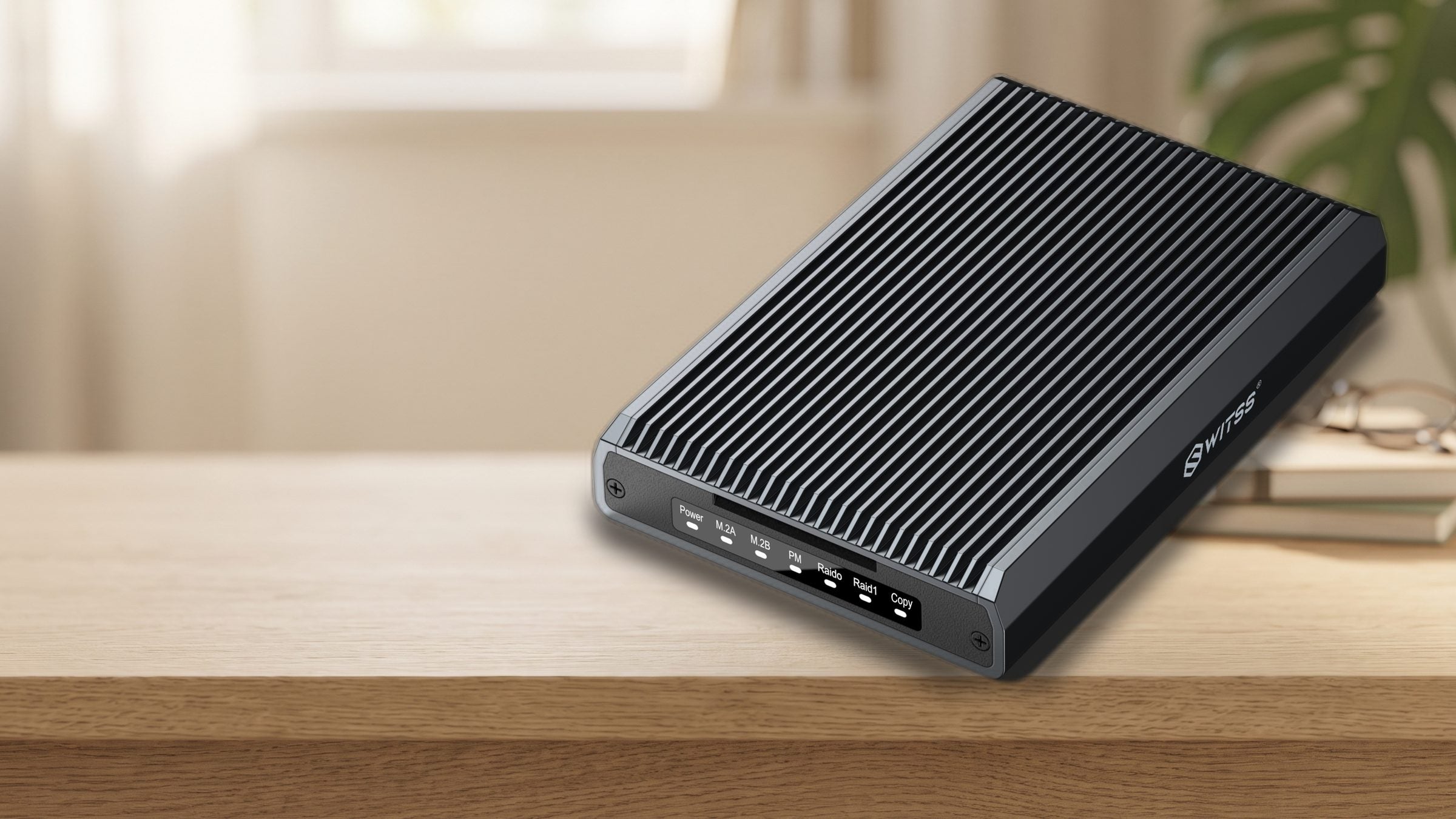

Switss® RAID Dual-Bay M.2 SSD Enclosure
Two M.2 SSDs in one enclosure. Choose maximum speed, double protection, or two separate drives, with a switch on the enclosure.
Order before 22:00, delivered tomorrow
Switss® RAID Dual-Bay
4x faster than USB 3.0, RAID 0/1, JBOD, or Clone, no software needed.
Two M.2 SSDs through a single USB-C connection. Use the switch to choose maximum speed, automatic backup, two separate drives, or an offline copy, no software needed.
More detail
The Switss® RAID Dual-Bay enclosure lets you use two M.2 SSDs at once through a single USB-C connection with speeds up to 20 Gbps. With the dip switches on the enclosure you choose maximum speed (RAID 0), automatic backup (RAID 1), two separate drives (JBOD), or an offline copy (Clone), no software, no computer needed. The aluminum enclosure with thermal pads keeps both SSDs cool, even during long, intensive use.
More detail
Two M.2 SSDs through a single USB-C connection. Use the switch to choose maximum speed, automatic backup, two separate drives, or an offline copy, no software needed.
The Switss® RAID Dual-Bay enclosure lets you use two M.2 SSDs at once through a single USB-C connection with speeds up to 20 Gbps. With the dip switches on the enclosure you choose maximum speed (RAID 0), automatic backup (RAID 1), two separate drives (JBOD), or an offline copy (Clone), no software, no computer needed. The aluminum enclosure with thermal pads keeps both SSDs cool, even during long, intensive use.
More detail
USB-C 3.2 Gen 2 reaches up to 20 Gbps, four times the bandwidth of the older USB 3.0 (5 Gbps). Use a host port that supports this speed for the full benefit; on an older USB 3.0 port the speed will be lower.
Please note: M.2 SSDs not included. Simply click in your own two drives.

automatically, on both SSDs
More detail
In RAID 1 mode the enclosure writes every file to both SSDs at the same time. If one drive fails, your files stay safe on the other. You do have only half of the total capacity available, set with the dip switches, no software needed.
More detail
In RAID 0 mode, the enclosure spreads files across both SSDs, so they work together as one super-fast drive. Ideal for large photo and video files. Note: if one SSD fails, you lose the data on both drives.

More detail
Both M.2 SSD slots share the same USB-C connection to your laptop or computer. One cable and one port, in any RAID mode.
Set RAID without software. Using the dip switches and confirm button on the enclosure, you choose the mode that suits you. No software to install, no computer needed.

Aluminum with thermal cooling. The aluminum enclosure dissipates heat through thermal pads on both SSD slots. Both drives stay at a stable temperature, even during long copying or streaming sessions.

Room for all your work. Two M.2 SSDs in one enclosure, fast enough for large photo libraries.

NVMe and SATA, four sizes. Fits M-Key and M+B-Key drives in sizes 2230, 2242, 2260, and 2280. Combine NVMe and SATA SSDs from any brand.

Your archive, doubly safe. In RAID 1 the enclosure automatically saves everything to two SSDs at once.

Up to 2× 8 TB storage. Without external power up to 2× 2 TB per SSD. Connect a USB-C charger and you get up to 2× 8 TB.
More detail
Without external power you can use SSDs up to 2× 2 TB. Connect a USB-C charger of 5V/3A and the enclosure supports SSDs up to 2× 8 TB.

With the dip switches inside the enclosure you set RAID 0, RAID 1, JBOD, or Clone mode and confirm your choice with the button; the lights on the front then show which mode is active. No software, no computer. Switching modes reinitializes the SSDs, so always back up your files before you change the mode.
More detail
With the dip switches inside the enclosure you set RAID 0, RAID 1, JBOD, or Clone mode and confirm your choice with the button; the lights on the front then show which mode is active. No software, no computer. Switching modes reinitializes the SSDs, so always back up your files before you change the mode.

In Clone mode you copy the contents of SSD A to SSD B with the push of a button, the enclosure doesn't need to be connected to a computer. Handy for making an exact backup copy of a drive.
More detail
In Clone mode you copy the contents of SSD A to SSD B with the push of a button, the enclosure doesn't need to be connected to a computer. Handy for making an exact backup copy of a drive.

Works instantly on your computer, game console, or phone, no drivers to install.
More detail
Works without drivers on Windows 7 and up, macOS 10.6.5 and up, and Linux. Also compatible with PlayStation 4 (games and media), iPhone 15 or newer, iPad Pro with USB-C, Android, and Chromebook. Connect and start using it right away.
With RAID 1 the enclosure writes every file to both SSDs at the same time. If one drive fails, your photos and documents stay safe on the other.
Photographers and video creators working with large files benefit from RAID 0: two SSDs work together as one super-fast drive.
In JBOD mode both SSDs appear as two separate drives on your computer. Handy if you want to expand your storage without RAID.
With Clone mode you copy SSD A completely to SSD B, without a computer. Ideal if you want an identical backup of a working drive.

| Specification | Switss® RAID Dual-Bay M.2 |
|---|---|
| Connection | USB-C 3.2 Gen 2 (up to 20 Gbps) |
| Maximum speed | Up to 20 Gbps via USB-C 3.2 Gen 2 |
| Number of bays | 2 (both in use at the same time) |
| Supported SSD types | M.2 NVMe and M.2 SATA (M-Key, M+B-Key) |
| Supported M.2 sizes | 2230, 2242, 2260, 2280 |
| RAID modes | RAID 0, RAID 1, JBOD, Clone (set via dip switches) |
| Maximum capacity | 2× 2 TB without power; 2× 8 TB with USB-C power (5V/3A) |
| Material and cooling | Aluminum enclosure with thermal pads |
| Compatibility | Windows 7+, macOS 10.6.5+, Linux, PS4, iPhone 15+, iPad Pro (USB-C), Android, Chromebook |
5% off from 2 units · 10% off from 10 units applied automatically in your cart
Invoice with VAT · KvK 76439534 · VAT NL860623646B01
No. The enclosure is supplied without M.2 SSDs. You install your own M.2 NVMe or SATA SSDs. Any brand and any capacity up to 2× 8 TB (with external power) is compatible.
RAID 0 (Striping): the enclosure spreads files across both SSDs. You get the combined capacity and higher speed, but if one SSD fails you lose all your data. RAID 1 (Mirroring): every file is saved to both SSDs at the same time. If one drive fails, your files stay safe on the other. You do have only half of the total capacity available.
Yes. Switching modes reinitializes the SSDs and all existing data is lost. Make a backup on another drive before you change the mode.
The enclosure fits M.2 NVMe and M.2 SATA SSDs with an M-Key or M+B-Key connector, in sizes 2230, 2242, 2260, and 2280. Regular 2.5 inch SATA or 3.5 inch hard drives do not fit.
The enclosure supports up to 20 Gbps via USB-C 3.2 Gen 2. Actual speed depends on your SSDs, the chosen RAID mode, and your computer's USB port. On an older USB 3.0 port (5 Gbps) the speed will be lower. NVMe SSDs reach higher speeds than SATA M.2 SSDs.
A new or empty SSD needs to be set up first. On Windows, open Disk Management (right-click the Start button and choose Disk Management) or Disk Utility on macOS, and initialize and format the drive. It will then appear as a regular drive and you can start saving files.
You make that choice entirely inside the enclosure; the lights on the front are not buttons, they only show which mode is active (PM is the factory setting: both SSDs then work as two separate drives). Set the dip switches to the position of the mode you want (the diagram is in the manual), make sure the enclosure is connected and has power, and hold the confirm button for a few seconds until the lights flash. Then check the front to see that the light of the new mode is on. If the old light is still on, set the dip switches to the correct position first and confirm again. Note: switching modes erases all existing files.
Each thermal pad has a thin protective film on both sides. Remove both films and place the pad on the chips of your SSD. As soon as you close the enclosure, the pad makes contact with the aluminum and the heat is carried away from the SSD. Don't skip this step: without a thermal pad the SSD can get too hot under heavy use.
No reviews yet
These products work extra well together. Ordered once, delivered once.


€69,99incl. VAT€57,84excl. VAT

Together
€169,98incl. VAT€140,48excl. VAT
€161,50incl. VAT€133,47excl. VAT
5% combo discount, automatically applied in your cart
Guide articles related to this product, with clear explanations on use and connection.

You're looking for a way to back up your files automatically without a cloud subscription, or you want to combine more storage...

You have a fast NVMe SSD, and internally it's good for thousands of MB/s. But put it in a regular USB-C enclosure,...

Thunderbolt 4, USB4 and USB 3.2 compared on speed: what the numbers mean, why the port is what matters, and which Switss...