

You have a fast NVMe SSD, and internally it's good for thousands of MB/s. But put it in a regular USB-C enclosure, and that speed drops back to around 1000 MB/s. For large video files, RAW photo archives or fast backups, that's a noticeable bottleneck. This article explains what a USB4 SSD enclosure changes, what you get out of it in practice, and when that step is worth it.
What is USB4, and why is it so much faster?
USB4 is a connection standard with bandwidth up to 40 Gbps: four times the 10 Gbps of a common USB-C 3.2 Gen 2 enclosure. That extra bandwidth is exactly what a fast NVMe SSD needs to show its full speed externally; on a 10 Gbps port, the SSD itself runs into the ceiling of the cable connection, not its own limit.
USB4 is technically closely related to Thunderbolt 3 and Thunderbolt 4: both standards share the same 40 Gbps base, which explains why equipment for one often also works on the other. Want to see those three standards (USB 3.2, USB4 and Thunderbolt 4) compared side by side with the underlying figures? That's laid out in Thunderbolt 4 vs USB4 vs USB 3.2: Speeds Compared.
What do you get out of it in practice with an NVMe SSD?
| Connection | Bandwidth | Top speed with a fast NVMe SSD |
|---|---|---|
| USB-C 3.2 Gen 2 (regular M.2 enclosure) | 10 Gbps | around 1000 MB/s |
| USB4 | 40 Gbps | up to 3000 MB/s read and write |
With a fast NVMe SSD on a USB4 port you get up to 3000 MB/s: three times as much as on a regular USB-C 3.2 Gen 2 enclosure. In concrete terms: you'd move a 30 GB video project in around ten seconds. These figures were measured with a fast NVMe SSD; actual speed always depends on your own drive. A SATA M.2 SSD reaches around 500 MB/s in the same enclosure regardless of the port: the SSD itself is then the limiting factor, not the connection.
Does it also work without a USB4 port on your laptop?
Yes. The enclosure works fine on a regular USB-C port, but then the speed drops back to the level of that port:
- USB4 or Thunderbolt 3/4 port: up to 3000 MB/s (with a fast NVMe SSD)
- USB 3.2 Gen 2 (10 Gbps): around 1000 MB/s
- USB 3.2 Gen 1 (5 Gbps): lower than that
So check first which port your laptop or desktop has before you buy: your device's specifications usually list this as "USB4" or "Thunderbolt". If you don't have that port, the regular M.2 enclosure with heatsink (10 Gbps, from €18,99) is the more logical and cheaper alternative. You won't get any extra speed out of a regular enclosure on a USB4 port anyway.
Which SSDs fit, and how does the enclosure stay cool?
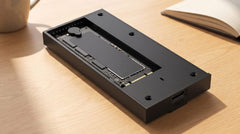
The enclosure works with M.2 NVMe and SATA SSDs, with an M-key or M+B-key connector, in the 2230, 2242, 2260 and 2280 formats, up to a capacity of 8 TB. M.2 PCIe 5.0 SSDs fit physically, but don't reach their full speed of that type over USB4: that ceiling sits at the 40 Gbps connection, not at the SSD.
The aluminium enclosure has a built-in heatsink with a thermal pad that dissipates heat. Under intensive use the enclosure feels warm: that's normal and not a problem; the SSD is actually protected because the heat is carried away instead of building up, which prevents automatic speed reduction (thermal throttling).
USB4 enclosure vs the regular M.2 enclosure: what's the difference?
| M.2 SSD enclosure with heatsink | M.2 SSD enclosure USB4, 40 Gbps | |
|---|---|---|
| Connection | USB-C 3.2 Gen 2, 10 Gbps | USB4, 40 Gbps |
| Top speed (NVMe) | up to 1050 MB/s read | up to 3000 MB/s read and write |
| Max. capacity | up to 2 TB | up to 8 TB |
| Price (switss.nl, checked 21 July 2026) | €18,99 | €69,99 |
| Suited for | Photos, documents, laptop upgrade, general use | 4K/8K video editing, large RAW archives, fast backups on a USB4 port |
If you mainly work with photos, documents or general files, the difference is barely noticeable in practice and the regular enclosure is the logical choice. If you work with large video files on a computer with a USB4 or Thunderbolt port, the difference is clearly noticeable. Still unsure which base format (M.2, 2.5-inch or 3.5-inch) fits your drive? Read Which enclosure do I need for my old hard drive? first.
In the box
- Switss M.2 SSD enclosure USB4, 40 Gbps
- USB-C to USB-C cable
- Quick start guide
The enclosure is supplied without an SSD: your own M.2 NVMe or SATA SSD clicks into it.
Frequently asked questions
Does the USB4 enclosure come with an SSD?
No. You fit your own M.2 NVMe or SATA SSD.
Does the enclosure also work on a regular USB-C port?
Yes, but then the speed will be lower. You only get the 40 Gbps and up to 3000 MB/s on a USB4 or Thunderbolt 3/4 port; on USB 3.2 Gen 2 (10 Gbps) the speed is around 1000 MB/s at most.
Which M.2 SSDs fit inside?
NVMe and SATA, M-key and M+B-key, in the 2230, 2242, 2260 and 2280 formats, up to 8 TB.
How warm does the enclosure get, and is that a problem?
The aluminium enclosure with heatsink and thermal pad dissipates heat. Feeling warm under intensive use is normal and actually protects the SSD's speed and lifespan.
How much warranty do I get?
2-year manufacturer's warranty, with Dutch customer service.
Next step
Do you have a fast NVMe SSD and a computer with a USB4 or Thunderbolt port, and want to put that speed to use externally too? Check the specifications and current price on the product page: Switss M.2 SSD enclosure USB4, 40 Gbps. Not sure if you have that port, or is 10 Gbps enough for your use? Check the regular M.2 enclosure with heatsink first.