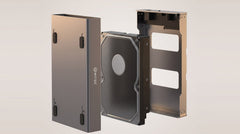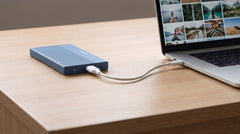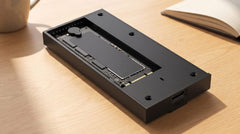


The short answer: first look at the type of drive. A laptop drive is usually 2.5 inch, a desktop drive 3.5 inch, and a modern SSD is often a narrow M.2 circuit board. Do you have a 2.5 inch or M.2 drive? Then your enclosure simply runs on USB power, no separate plug needed. Do you have a 3.5 inch desktop drive? Then you need an enclosure with its own power adapter. Not sure? Try the selection guide, one question and you immediately see what fits.
Why an enclosure is so useful
Do you have a drive left in a drawer after an upgrade? An enclosure gives it a second life. You put the drive in, connect it via USB to your laptop or PC, and you are done: you have an external drive for backups, holiday photos or extra storage. You save money, you throw nothing away, and within a few minutes you have a solution that fits your drive exactly.
The trick is simply choosing the right enclosure. We walk you through it in three short steps.
Step 1: what size is your drive?
This is by far the most important factor. The size determines which enclosure fits, and you usually recognise it straight away from where the drive came from.
- 2.5 inch: the flat, compact drive from a laptop. Runs on USB power, so no separate plug needed. Ideal for a portable external drive. For this there is the Switss® 2.5 inch enclosure: small, sturdy and with a fast USB-C connection.
- 3.5 inch: the larger, heavier drive from a desktop PC. Has more storage, but also needs more power and therefore a separate power adapter. Perfect as a fixed archive drive at your desk. The Switss® 3.5/2.5 inch enclosure works with both sizes and comes with power supply, cables and an on/off switch.
- M.2: a narrow, rectangular card that sits directly in a laptop or motherboard. These are modern, fast SSDs. For this you need a dedicated M.2 enclosure.
Not sure whether you have 2.5 or 3.5 inch? A rule of thumb: if the drive came from a laptop, it is almost always 2.5 inch. If it came from a desktop tower, it is usually 3.5 inch.
Step 2: SATA or M.2, which connection do you have?
Besides the size, how the drive connects also matters. No worries, there are only two flavours.
SATA is the classic connection of ordinary hard drives and older SSDs. These reach speeds of up to about 550 MB/s, more than enough for backups and files. For this type you choose a 2.5 or 3.5 inch enclosure that supports SATA.
M.2 is the narrow card format, and within that there are two variants:
- M.2 SATA: just as fast as ordinary SATA, but more compact.
- M.2 NVMe: much faster, with speeds that fully use the USB connection.
An ordinary SATA enclosure does not fit an M.2 card, so watch out for this. The good news is that the Switss® M.2 enclosure with heatsink supports both NVMe and M.2 SATA, in sizes 2230, 2242, 2260 and 2280. So you do not need to figure out first which of the two you have, it works with both.
Step 3: the USB connection determines your speed
Good to know: with an external drive, the USB connection of the enclosure is often the limit for speed. With ordinary hard drives you do not notice this, because the drive itself is slower. But with a fast NVMe SSD you want a connection that truly makes use of that speed.
| Connection | Speed (approx.) | Good for |
|---|---|---|
| USB 3.2 Gen 2 (USB-C) | 10 Gbps / 1050 MB/s | SATA and M.2 drives, everyday use |
| USB4 / Thunderbolt | 40 Gbps / up to 3000 MB/s | The fastest NVMe SSDs, heavy files |
The Switss enclosures have modern USB-C connections. This means you are well covered for laptops, PCs and even game consoles, and you get more than enough speed for most drives. Do check whether your laptop has a USB-C port, if a USB-A cable is included, it also works on older ports.
Straight to the right model
Here you can see at a glance which enclosure belongs to which situation:
| Your drive | Best choice | Why |
|---|---|---|
| 2.5 inch laptop drive (HDD or SSD) | Switss® 2.5 inch enclosure | Compact, portable, runs on USB power |
| 3.5 inch desktop drive | Switss® 3.5/2.5 inch enclosure | Power supply included, also works with 2.5 inch |
| M.2 SSD (SATA or NVMe) | Switss® M.2 enclosure | Blazing fast, universal, with cooling |
Also pay attention to these details
A few small things make using it more pleasant. An aluminium enclosure with heatsink keeps your SSD cool, which benefits its lifespan. Plug & play means you do not need to install any software: drive in, cable in, done. And a physical on/off switch is handy for a large desktop drive that you do not always need. With many Switss models you also get both a USB-C and a USB-A cable, so you always have the right one.
Conclusion
An old drive does not have to gather dust. Determine the size, the connection and the USB speed in three steps, and you know exactly which enclosure fits. Whether you choose compact and portable (2.5 inch), maximum storage (3.5 inch) or ultra fast performance (M.2), at Switss® you find a reliable, user friendly solution, with Dutch customer service, 2 year warranty and 30 day returns.
Not sure yet what fits your drive? Then try the selection guide: which enclosure fits you. You answer one question and immediately see the right model.
Frequently asked questions
How do I know if my drive is 2.5 or 3.5 inch?
If the drive came from a laptop, it is almost always 2.5 inch (flat and compact). If it came from a desktop PC, it is usually 3.5 inch (larger and heavier).
Do I need a separate power supply?
Only for 3.5 inch desktop drives; these come with a power adapter. A 2.5 inch drive and an M.2 SSD get their power directly from the USB cable.
Does an enclosure work with both Windows and Mac?
Yes. The Switss enclosures are plug & play and work with Windows, macOS and Linux. You do not need to install any software.
Can I also use the external drive on a PlayStation or Xbox?
Yes, thanks to the USB-C connection the enclosures also work with game consoles, handy for extra game storage or backups.
Does the enclosure work with both a hard drive and an SSD?
Yes. The 2.5 and 3.5 inch enclosures work with both classic hard drives and SSDs with a SATA connection. Not sure about your drive? Then try the selection guide.