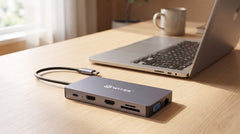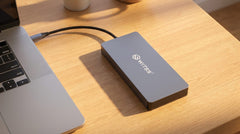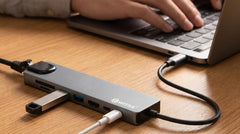


The short answer: first count what you actually want to connect (screens, network, USB devices, charging), then choose your hub. If two monitors and the standard ports are enough for you, the Switss® 8-in-1 USB-C hub has you covered. Working with three screens or heavier setups? Choose the 12-in-1 hub.
Start at your desk, not at the specs
A USB-C hub is a small device that plugs into a single port on your laptop and instantly turns it into several ports: for an extra screen, wired internet, your mouse and keyboard, and charging your laptop. Finally, no more constantly swapping cables.
The easiest way to choose: look at your workspace and count what you want to connect at the same time. Write it down for a moment. That list determines which hub you need, not the other way around.
Step 1: count your screens
For most home workers, this is the most important question. Do you want one extra monitor next to your laptop screen? Then a hub with a single HDMI port is enough. Do you want two or three external screens for more overview? Then you need a hub that can handle that.
- One extra screen → a hub with 1x HDMI is enough.
- Two or three screens → choose a hub with multiple video outputs, such as the 12-in-1 with 2x HDMI and 1x VGA.
Note: whether a hub can drive multiple screens also depends on your laptop. On Windows, two or three separate screens usually work without issues. On a MacBook, one external screen through such a hub is standard. Not sure? Our Dutch customer service is happy to think along with you.
Step 2: check which USB-C port your laptop has
Not every USB-C port can carry a video signal. For that, your laptop needs to support DisplayPort Alt Mode over USB-C. That sounds more technical than it is: almost all modern laptops, MacBooks and iPads with USB-C have this. Very old or entry-level models sometimes don't.
The rule of thumb that always applies: with a USB-C hub, the connection determines the speed. A USB 3.2 Gen 2 connection reaches around 10 Gbps (about 1050 MB/s), more than enough for external drives and fast file transfers. Not sure whether your laptop is suitable? Check the compatibility overview on the product page, where you can see per port and operating system what works.
Step 3: decide whether you want to charge your laptop
Many people forget this, even though it's so convenient. With Power Delivery (PD) you charge your laptop through the same hub you use for your screens and peripherals. One cable to your laptop, done.
The 8-in-1 delivers up to 65W, enough for most laptops and always enough for smartphones and tablets. If you work with a more powerful laptop, the 100W of the 12-in-1 is more comfortable. Keep in mind that part of that power is used by the hub itself.
Which Switss hub suits you?
Three models cover just about every workspace. Below you can see at a glance which one matches your situation.
| Your situation | Best choice | Why |
|---|---|---|
| Home worker or student, one extra screen, on the go | 8-in-1 hub | Compact and light, HDMI 4K, ethernet, PD 65W and a card reader |
| Fixed workspace with two or three screens | 12-in-1 hub | 2x HDMI + VGA, gigabit ethernet, PD 100W, plenty of ports and audio jack |
| Hub and fast external storage in one | 5-in-1 dock with M.2 | Built-in M.2 SSD enclosure up to 8TB, HDMI 4K, PD 100W, USB 3.2 Gen 2 |
Compact and on the go: the 8-in-1
Is one extra screen and a few ports enough for you, and do you want something that easily fits in your bag? Then the 8-in-1 is the logical choice. It offers HDMI (4K@30Hz), USB-C PD up to 65W, an RJ45 network port, two USB-A 3.0 ports, a USB-C data port and an SD plus MicroSD card reader.
More screens, more ports: the 12-in-1
Do you work with multiple monitors or heavier software at a fixed location? The 12-in-1 drives up to three screens (2x HDMI 4K@60Hz and 1x VGA), charges with 100W, has gigabit ethernet, three USB-A ports, a USB-C data port, a dual card reader and even a 3.5mm audio connection.
Hub plus storage: the 5-in-1 with M.2
Do you want lightning-fast external storage alongside extra ports? Then choose the 5-in-1 docking station with M.2. Slide in an M.2 SSD (NVMe or SATA, sizes 2230 to 2280, up to 8TB) and you instantly have a hub with HDMI (4K@60Hz), USB-A and USB-C ports, PD up to 100W and USB 3.2 Gen 2 speeds up to 10 Gbps.
Why choosing a Switss hub is a safe bet
All Switss hubs are plug & play: connect and use, without any driver hassle. They work with Windows, macOS, Linux, iPads with USB-C and most smartphones. The aluminum housing dissipates heat well, and the right cables are included.
And if it doesn't fit or you're not happy with it after all: you get a 2-year warranty, 30 days to return it, and Dutch customer service that simply talks to you.
Conclusion
Choosing becomes simple if you turn it around: first count what you want to connect, then see which hub can handle that. One extra screen and working on the go? The 8-in-1. Three screens at a fixed workspace? The 12-in-1. And if you want storage and ports in one device, the 5-in-1 dock with M.2 is your solution. Check out the hubs and find the model that fits your desk.
Frequently asked questions
How many screens can I connect to a USB-C hub?
That depends on the hub and your laptop. The 8-in-1 drives one extra screen, the 12-in-1 up to three (2x HDMI + VGA). On Windows, multiple screens usually work without issues; on a MacBook, one external screen through such a hub is generally standard.
Does a Switss hub work with my MacBook or Windows laptop?
Yes. All Switss hubs are plug & play and work with Windows, macOS, Linux, iPads with USB-C and most smartphones. You don't need to install any drivers: connect and use.
Can I charge my laptop through the hub?
Yes, via Power Delivery (PD). The 8-in-1 delivers up to 65W, the 12-in-1 and the 5-in-1 dock up to 100W. That way you charge your laptop with the same cable you use to connect your screens and devices.
How do I know if my USB-C port supports an external screen?
For that, your laptop needs to support DisplayPort Alt Mode over USB-C. Almost all modern laptops, MacBooks and iPads with USB-C have this. Not sure? Check the compatibility overview on the product page or ask our customer service.
What's the difference between the 8-in-1 and the 12-in-1?
The 8-in-1 is more compact, ideal for on the go and one extra screen (PD 65W). The 12-in-1 is for a fixed workspace: up to three screens, gigabit internet, more ports and PD 100W.