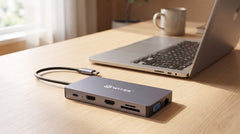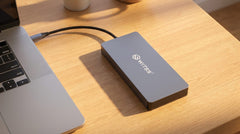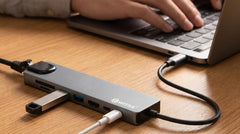


The short answer: choose the 5-in-1 if you want one screen plus fast storage in the same unit, the 8-in-1 for a light, reliable home office setup with ethernet, and the 12-in-1 if you want three screens and every connection at once. Below you will find which one fits your situation best.
The number in the name does not tell the whole story
Switss® has three USB-C hubs, and at first glance the difference looks simple: more ports as the number goes up. But the real distinction comes down to four things: how many screens you can drive, how much power the hub delivers to charge your laptop (Power Delivery), whether it has ethernet, and whether you can fit storage in it. That is what your choice really comes down to.
Good to know beforehand: all three are plug and play. You plug the hub into your laptop's USB-C port and you are set. No drivers, no installation. It works on macOS, Windows, and Linux.
At a glance
| Feature | 5-in-1 + M.2 | 8-in-1 | 12-in-1 |
|---|---|---|---|
| Screens at once | 1 (4K HDMI at 60 Hz) | 1 (4K HDMI) | 3 (2× HDMI + VGA) |
| Laptop charging (PD) | 100 W | 65 W | 100 W |
| Ethernet (RJ45) | No | Gigabit | Gigabit |
| Card reader | No | SD + microSD | SD + microSD |
| USB-A | 2× | 2× USB 3.0 | 2× |
| Audio jack | No | No | Yes (3.5 mm) |
| Built-in M.2 storage | Yes (NVMe + SATA) | No | No |
5-in-1: hub and external drive in one
The 5-in-1 is the most distinctive of the three. Inside the housing sits an empty M.2 slot where you fit your own SSD, NVMe or SATA, in whatever capacity you choose. That gives you a hub and a fast external drive in one compact unit, without carrying a separate drive around.
It also has 4K HDMI at 60 Hz, 100 W Power Delivery to charge your laptop at full power, two USB-A ports, and a USB-C data port. What it does not have: ethernet and a card reader.
Fits you if you need a lot of local storage (think photo and video work), you already have an M.2 SSD you would like to put to good use, or you simply want one screen with powerful charging on top.
8-in-1: the no-nonsense home office hub
The 8-in-1 is the most balanced choice for everyday office work. You get a 4K HDMI output, Gigabit ethernet for a stable wired connection, an SD and microSD card reader, two USB 3.0 ports, and 65 W Power Delivery. Everything a home office needs, nothing you will never use.
The 65 W is worth checking first. For a MacBook Air, a tablet, or a lighter Windows laptop, that is more than enough. If you have a heavier laptop, such as a 14 or 16 inch MacBook Pro or a gaming laptop, 65 W may not be enough to charge at full speed while you work. In that case, look at the 5-in-1 or the 12-in-1, both of which deliver 100 W.
Fits you if you want one external screen, a wired internet connection, and a card reader, and your laptop charges at 65 W or less.
12-in-1: a workstation on a single cable
The 12-in-1 is the most complete hub. With two HDMI outputs plus a VGA connection, you can drive three external screens at once, something you would normally only find on a full docking station. On top of that come Gigabit ethernet, 100 W Power Delivery, an SD and microSD card reader, two USB-A ports, and a 3.5 mm audio jack.
That audio jack comes in handy for a headset or speakers without USB-C. And with 100 W, even a more powerful laptop keeps charging while you work. The hub is slightly larger than the 8-in-1, but still a lot more compact, and cheaper, than a separate docking station.
Note: whether you can really drive three screens at once also depends on your laptop. It needs to support this over USB-C (known as Alt Mode). Not sure? Our Dutch customer service is happy to help you check.
Fits you if you want two or three screens, need an audio jack, or want to replace a docking station with something more compact.
Which one do you choose?
| What you want | Best choice |
|---|---|
| One screen plus your own fast storage | 5-in-1 + M.2 |
| A light everyday hub with ethernet and a card reader | 8-in-1 |
| A laptop that needs more than 65 W | 12-in-1 or 5-in-1 |
| Two or three screens at once | 12-in-1 |
| An audio jack for a headset or speakers | 12-in-1 |
Conclusion
In short: the 5-in-1 if storage is your priority, the 8-in-1 for a light, reliable everyday hub, and the 12-in-1 if you want the maximum, with three screens, 100 W charging, ethernet, card readers, and audio. For most people, the Switss 12-in-1 USB-C hub is the most future-proof choice, but if you already know exactly what you need, the right smaller hub saves you money and desk space.
Every Switss hub comes with a 2-year warranty, 30-day returns, and Dutch customer service. Still torn between two models? Feel free to send us a message and we will help you figure it out.
Frequently asked questions
Which Switss hub has built-in storage?
Only the 5-in-1. It has an empty M.2 slot where you fit your own NVMe or SATA SSD, giving you a hub and a fast external drive in one unit.
What does 65 W or 100 W Power Delivery mean?
That is how much power the hub delivers to charge your laptop. 65 W (8-in-1) is enough for a MacBook Air and lighter laptops. For a 14 or 16 inch MacBook Pro or a gaming laptop, choose 100 W (5-in-1 or 12-in-1).
Can the 12-in-1 really drive three screens at once?
Yes, through two HDMI outputs and a VGA connection. Your laptop does need to support this over USB-C (Alt Mode). Not sure? Our customer service can help you check.
Do I need to install drivers?
No. All three hubs are plug and play: connect to the USB-C port and you are done. They work on macOS, Windows, and Linux.
Which hub is best for a MacBook Pro?
The 12-in-1, thanks to its 100 W charging power and three screens. If you also want fast external storage in the same device, the 5-in-1 with M.2 is a strong option.