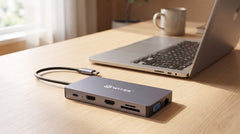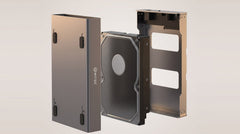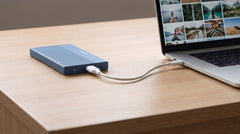


You've got an M.2 SSD lying around (left over from a laptop upgrade, or bought specifically to use externally) and you're looking for an enclosure to go with it. A search for "m.2 ssd enclosure" turns up dozens of options, with prices ranging from a few tens of euros to well over a hundred, and specifications that look similar at first glance. This article walks through what actually matters: which type of M.2 SSD you have, what speed is realistic, and which enclosure fits it.
First things first: which type of M.2 SSD do you have?
Not every M.2 SSD is the same. There are two technologies that fit the same physical slot but have nothing in common when it comes to speed:
- NVMe (PCIe): the faster technology. In a USB-C 3.2 Gen 2 enclosure, this gets you up to 1050 MB/s read and 1000 MB/s write.
- SATA (NGFF): older and slower, up to around 500 MB/s, also in the same enclosure.
Both types are physically M.2, with an M-key or B&M-key connector, and fit the same enclosures. So the shape tells you nothing about the speed. Not sure which type your SSD is? The article NVMe vs SATA M.2 SSD: what's the difference (and what do you need)? explains how to check before you order an enclosure.
M.2 SSDs also come in four common lengths: 2230, 2242, 2260 and 2280 (the number stands for width × length in mm). Most laptop and desktop SSDs are 2280; check this on the SSD itself or in the specifications before ordering.
What should you look for in an M.2 SSD enclosure?
A good enclosure scores well on five points:
| What to look for | Why it matters |
|---|---|
| Connection | USB-C 3.2 Gen 2 (10 Gbps) is the standard for NVMe; if you want the full speed of a fast NVMe SSD, USB4 (40 Gbps) is a separate step up |
| Cooling | SSDs automatically slow themselves down when they get too hot (thermal throttling); an aluminium enclosure with a heatsink dissipates that heat |
| Mounting | Tool-free (the SSD clicks into place) is faster and avoids lost screws; some cheaper enclosures do require a screwdriver |
| Material | Aluminium conducts heat better than plastic and holds up better against knocks on the go |
| Warranty | 2-year manufacturer's warranty included, with Dutch customer service for questions or issues |
Speed in practice: what does 10 Gbps actually mean?
Gbps (gigabit per second) is the speed of the connection; MB/s (megabyte per second) is the speed at which you actually transfer files. These aren't the same thing. Don't confuse them when comparing specifications.
With an NVMe SSD in a USB-C 3.2 Gen 2 enclosure (10 Gbps), you get up to 1050 MB/s read and 1000 MB/s write. A 20 GB 4K video transfers in around 20 seconds. A regular external hard drive manages roughly 130 MB/s, over eight times slower. With a SATA SSD in the same enclosure, you're looking at around 500 MB/s: still faster than a hard drive, but clearly less than NVMe.
Want to go even higher (up to 3000 MB/s with a fast NVMe SSD)? That means a different connection: USB4 (40 Gbps), four times the bandwidth of USB-C 3.2 Gen 2. The article Thunderbolt 4 vs USB4 vs USB 3.2: Speeds Compared puts the standards side by side. Further on in this guide, we also cover when that step is worth it.
Compare: which M.2 enclosure fits your use?
Switss sells three variants of M.2 enclosure, each for a different use. Prices below were checked on switss.nl on 21 July 2026. Check the product page for the current price.
| One M.2 SSD, standard use | Two M.2 SSDs, backup or extra capacity | Maximum speed | |
|---|---|---|---|
| Product | M.2 SSD enclosure with heatsink | RAID Dual-Bay M.2 SSD enclosure | M.2 SSD enclosure USB4, 40 Gbps |
| Connection (bandwidth) | USB-C 3.2 Gen 2, 10 Gbps | USB-C 3.2 Gen 2, 20 Gbps | USB4, 40 Gbps |
| Top speed with NVMe SSD | up to 1050 MB/s read | not specified separately (depends on the RAID mode chosen and your SSDs) | up to 3000 MB/s read and write |
| Number of SSD slots | 1 | 2 (RAID 0/1, JBOD or clone) | 1 |
| Max. capacity | up to 2 TB | up to 2× 8 TB (with external power supply) | up to 8 TB |
| Price | €18,99 | €99,99 | €69,99 |
Choose the enclosure with heatsink if you have one M.2 SSD and want fast, affordable external storage for photos, videos or a hassle-free laptop upgrade. Choose the RAID Dual-Bay if you want to automatically mirror two SSDs for backup, or combine the capacity of two drives. The modes are explained in RAID 0 vs RAID 1 Explained: Speed or Safety?. Choose USB4 if you work with large video files on a fast NVMe SSD and the 10 Gbps port is a noticeable bottleneck.
Will my SSD actually fit?
The M.2 SSD enclosure with heatsink works with both NVMe (PCIe) and SATA (NGFF) SSDs, with an M-key or B&M-key connector, in sizes 2230, 2242, 2260 and 2280, up to 2 TB. Tested with, among others, Crucial P3, Samsung 860 EVO, Kingston A2000 and Intel 660P. A regular 2.5-inch SSD or hard drive won't fit. That's a different form factor, with its own enclosure.
Installation: no screws, no drivers
The SSD clicks into the enclosure without screws. You connect it using the included 2-in-1 cable (USB-C → USB-C and USB-C → USB-A), and the enclosure works straight away on Windows, macOS and Linux, no driver installation needed. If you're using a new or blank SSD, you prepare it once via Disk Management (Windows) or Disk Utility (macOS). After that, it shows up as a regular drive.
Frequently asked questions
What's the difference between NVMe and SATA in an M.2 enclosure?
NVMe (PCIe) is faster and reaches up to 1050 MB/s; SATA (NGFF) goes up to around 500 MB/s. Both fit physically in the same enclosure.
Which M.2 sizes fit the enclosure with heatsink?
2230, 2242, 2260 and 2280, up to 2 TB. Not suitable for 2.5-inch SSDs or hard drives.
Does the enclosure come with an SSD?
No. The enclosure is supplied without an SSD: you fit your own M.2 NVMe or SATA SSD, which clicks into place without screws.
Does the enclosure work on a PlayStation or Xbox?
On the PlayStation 4, it works for both games and media. On the PlayStation 5 and Xbox, only for media such as films and music, not for installing games.
How much warranty do I get?
2-year manufacturer's warranty, with Dutch customer service.
Next step
Now that you know which type of SSD you have and what you want to do with it, check the specifications and current price on the product page: Switss M.2 SSD enclosure with heatsink. If you're working with two SSDs or want automatic backup, read on about the RAID Dual-Bay enclosure. Looking for the highest speed for a fast NVMe SSD? Check out the USB4 enclosure, 40 Gbps.