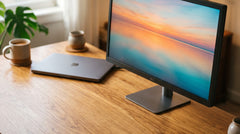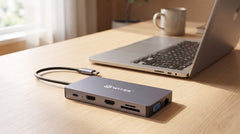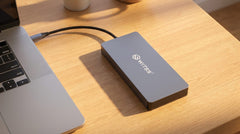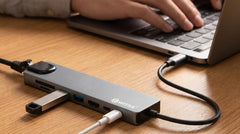


Two screens next to your laptop instantly give you more overview: email on the left, a document on the right, while your laptop stays closed or joins in as a third workspace. You don't need a new laptop or a separate graphics card for that: a USB-C hub with two video outputs does the job, provided your laptop supports it and you pick the right hub. Not every hub can do this: this guide shows which Switss hub can drive two external monitors, how to connect it on Windows and macOS, and what resolution and refresh rate you can expect.
What do you need to connect two monitors?
To connect two external monitors to your laptop at the same time via USB-C, you need two things: a laptop with a USB-C port that carries a video signal (known as DisplayPort Alt Mode), and a hub with at least two video outputs. That second point is exactly why not every hub is suitable for this. The Switss 8-in-1 hub, for example, has only one HDMI output and therefore supports only one external screen. That's not enough for two monitors. The Switss 12-in-1 hub does have three video outputs (2x HDMI and 1x VGA), which makes it the product in the Switss line-up that can drive two, and on Windows even three, external screens at the same time.
Whether your laptop's USB-C port has DisplayPort Alt Mode is usually listed in the manual or on the specification page of your laptop, next to the description of the USB-C port: "USB-C with DP", "USB-C with DisplayPort" or "Thunderbolt". If your laptop only has a basic USB-C port for charging, without data or video, no hub will work for screen expansion.
Windows: how to connect two screens
- Check whether your laptop's USB-C port supports DisplayPort Alt Mode (see above).
- Connect the Switss 12-in-1 hub to your laptop's USB-C port.
- Connect two monitors to the hub: via the two HDMI ports for the sharpest image quality on both screens, or via one HDMI port and the VGA port if one of your monitors or a projector doesn't have HDMI.
- Windows detects both screens automatically. Go to Settings > System > Display to choose whether you want to extend the display (two separate workspaces) or duplicate it (the same image on both screens).
- Optionally, connect your own USB-C charger to the hub's PD port, and your laptop charges at the same time with up to 100 watts.
MacBook: what's possible and what isn't
On a MacBook, this works differently. On macOS, the Switss 12-in-1 hub gives you a maximum of one external screen, via HDMI or VGA, even though the hub itself has three video outputs. That's not a limitation of the hub, but of how macOS handles USB-C video: MacBooks with an M1 or M2 chip support only one external screen at a time through the built-in USB-C Alt Mode. Two or three screens at once from a single USB-C port is only possible on macOS with a dock that uses DisplayLink technology (a different technique from the one this hub uses). If you want two monitors on a MacBook, this hub isn't the right route.
Which screen combinations can you make?
With two screens via the 12-in-1 hub, there are two combinations, depending on which ports you use:
- Two monitors via HDMI: both screens display 4K at 30Hz.
- One monitor via HDMI, one via VGA: the HDMI screen displays 4K at 30Hz, the VGA screen up to 1080p at 60Hz (handy for an older monitor or projector without an HDMI connection).
If you want to dig deeper into what resolution and refresh rate mean in practice (for example, the difference between 30Hz and 60Hz for text work versus video), the article "USB-C hub with HDMI: what resolution and refresh rate can you expect?" covers that in more detail.
Enough power and ports for the rest of your desk
Besides the screens, the 12-in-1 hub also keeps the rest of your workspace connected: gigabit ethernet via RJ45 (up to 1000 Mb per second wired internet), two USB 3.0 ports (up to 5 Gbps) plus a USB 2.0 port and a separate USB-C data port, an SD and microSD card reader that work simultaneously (up to 480 Mb per second per reader), and a 3.5 mm audio jack. The USB-C PD port charges your laptop with up to 100 watts, enough for virtually any USB-C laptop, including a 16-inch MacBook Pro (96W). To do so, you connect your own USB-C charger to the hub's PD port; the hub itself doesn't come with a separate power adapter. The housing is compact aluminium, 161 x 71 x 20 mm and 130 grams.
Exactly how many watts you need for your laptop, and why a hub sometimes delivers less than your own charger promises, is explained in the article Charging a laptop through a USB-C hub: how many watts (Power Delivery) do you need?.
Do you only need one external screen?
If you only want one external screen, the Switss 8-in-1 hub from €11,99 is the cheaper alternative. Do note: this hub has one HDMI output and explicitly does not support two monitors at the same time. For two screens, you need the 12-in-1 hub. On that one screen, the 8-in-1 does deliver the same 4K image quality (30Hz), plus 100 Mbps ethernet (Gigabit ethernet from €19,99), two USB 3.0 ports, an SD/microSD card reader and 65W charging via USB-C PD, in a more compact aluminium housing measuring 178 x 30 x 10 mm.
| Specification | Switss 8-in-1 hub | Switss 12-in-1 hub |
|---|---|---|
| Video outputs | 1x HDMI | 2x HDMI + 1x VGA |
| Max. external screens | 1 (Windows and macOS) | 3 on Windows; 1 on macOS |
| HDMI resolution | 4K UHD at 30Hz | 4K UHD at 30Hz (per HDMI port) |
| VGA resolution | not available | 1080p at 60Hz |
| Charging (PD) | 65W (87W power supply needed for full power) | 100W (passthrough) |
| Ethernet | 100 Mbps RJ45; Gigabit (up to 1000 Mb/s) from €19,99 | Gigabit RJ45, up to 1000 Mb/s |
| Warranty | 2-year manufacturer's warranty | 2-year manufacturer's warranty |
| Price | from €11,99 | €29,99 |
Prices and specifications above were checked on switss.nl on 24 July 2026. Check the product page for the current price.
Looking for three screens instead?
Wondering how far you can go on Windows with three screens at once, or how this works exactly on a MacBook? Three screens on your laptop or MacBook: what's possible? goes into that in more detail.
Screen not working right away?
- Check whether your laptop actually supports USB-C with DisplayPort Alt Mode (see above). Without that support, every external screen stays black, regardless of which hub you use.
- Check that the HDMI or VGA cable is properly connected on both ends.
- Restart your laptop with the hub and screens connected.
- On Windows, go to Settings > System > Display and choose "Detect"; on macOS, go to System Settings > Displays.
If a screen still stays black despite all this, or it works sometimes and not other times, USB-C hub and a second monitor: why doesn't it always work? goes deeper into the most common causes.
Still unsure which hub fits you?
Torn between the 8-in-1, the 12-in-1 or the 5-in-1 with a built-in M.2 slot? 5-in-1 vs 8-in-1 vs 12-in-1: which Switss USB-C hub fits you? puts all three side by side.
A complete setup: hub, screen and storage
If you're setting up a complete home office, customers often combine the 12-in-1 hub with a Switss M.2 SSD enclosure for fast, swappable storage alongside the two screens. If you're just starting a new laptop setup and still need to transfer files from your old computer, the article "Transferring files to your new computer: the simple way without the cloud" can help. If you're not sure which M.2 SSD enclosure fits you, "Buying an M.2 SSD enclosure: the complete buying guide (which one fits your drive and use case?)" lays out the options.
Frequently asked questions
Can I connect two monitors with the Switss 8-in-1 hub?
No. The 8-in-1 hub has one HDMI output and therefore supports one external screen. For two monitors, you need the Switss 12-in-1 hub.
Can I connect two screens at the same time on a MacBook via the 12-in-1 hub?
No. On macOS, the hub works for one external screen via HDMI or VGA. Two or three screens at once via a single USB-C port isn't possible on macOS without DisplayLink technology, which this hub doesn't use.
Which laptops support two external screens via USB-C?
Laptops with a USB-C port that supports DisplayPort Alt Mode. Check the manual or specifications of your laptop to see whether the port is described as "USB-C with DP", "USB-C with DisplayPort", "Thunderbolt 3" or "Thunderbolt 4". If it is, video works through this hub.
Do I need a separate power adapter for the hub itself?
No. The hub draws power through your laptop's USB-C port. If you want to charge at the same time, connect your own USB-C adapter to the hub's PD port.
What's the difference in image quality between the HDMI and VGA outputs?
The HDMI outputs deliver 4K at 30Hz. The VGA output delivers up to 1080p at 60Hz.
How much warranty do I get?
A 2-year manufacturer's warranty, with Dutch customer service.
Next step
Want to connect two monitors to your laptop? Check the specifications and current price on the product page: Switss® 12-in-1 USB-C Dockingstation. If you only need one external screen, the more compact and cheaper Switss 8-in-1 USB-C Hub will do.